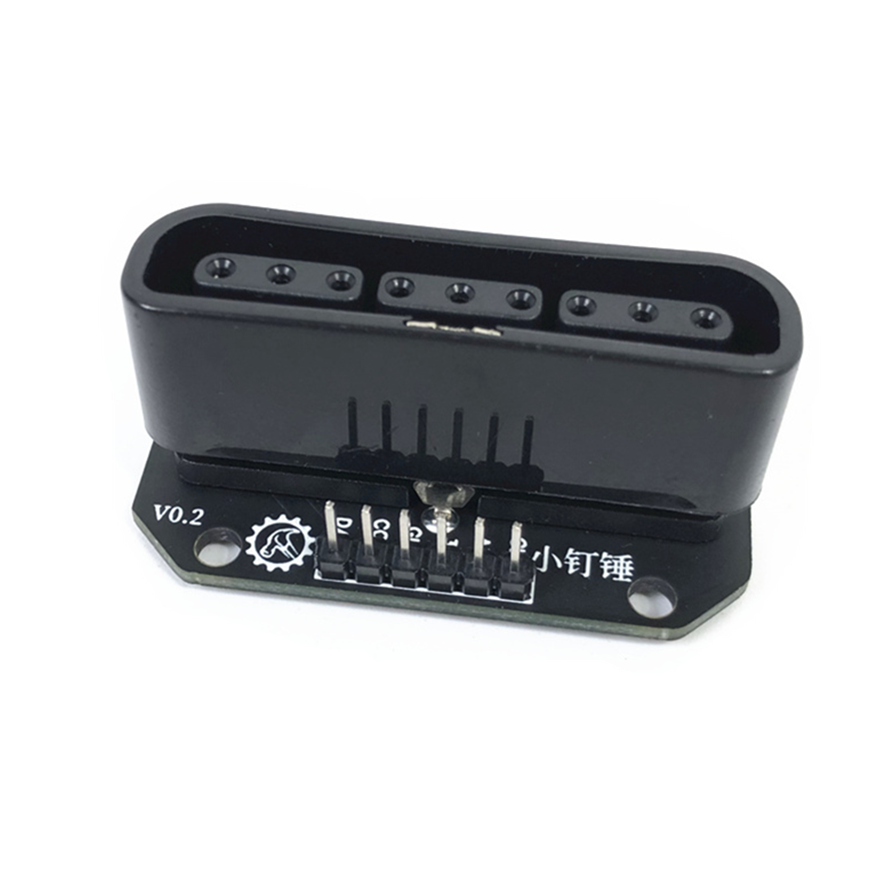
SNA Electronic moduleps2 plug to dupont male receiver conversion socket controller adapter for Arduino SNA170
ps2 plug to dupont male receiver conversion socket controller adapter for Arduino SNA170 Use: For PS2
官网原始名称
ps2 plug to dupont male receiver conversion socket controller adapter for Arduino SNA170
来源:Makerbuying 官网 · 采集日期:2026-11-04。原始名称中的编号与版本写法保留来源信息,具体参数、套装内容和兼容性请以官网确认结果为准。
查看官网产品 ↗本页用于产品展示,不提供站内下单,不显示未经确认的实时价格或库存。
Original product documentation
Archived from the official source. Refer to the source product page for the latest specifications and configuration.
ps2 plug to dupont male receiver conversion socket controller adapter for Arduino SNA170
Use:
For PS2 controller receiver and arduino connection
Parameter: Screw hole 3.2mm diameter
Size: 44mm * 11.5mm * 21mm
how to use:
attention is CS/SEL
#include <PS2X_lib.h>
#include <PS2X_lib.h> //for v1.6
PS2X ps2x; // create PS2 Controller Class
//right now, the library does NOT support hot pluggable controllers, meaning
//you must always either restart your Arduino after you conect the controller,
//or call config_gamepad(pins) again after connecting the controller.
int Left_motor_back=9; //左电机后退(IN1)
int Left_motor_go=5; //左电机前进(IN2)
int Right_motor_go=6; // 右电机前进(IN3)
int Right_motor_back=10; // 右电机后退(IN4)
int Right_motor_en=8; // 右电机前进(EN2)
int Left_motor_en=7; // 右电机后退(EN1)
int error = 0;
byte type = 0;
byte vibrate = 0;
void setup(){
Serial.begin(57600);
//初始化电机驱动IO为输出方式
pinMode(Left_motor_go,OUTPUT); //
pinMode(Left_motor_back,OUTPUT); //
pinMode(Right_motor_go,OUTPUT);//
pinMode(Right_motor_back,OUTPUT);//
//CHANGES for v1.6 HERE!!! **************PAY ATTENTION*************
error = ps2x.config_gamepad(13,11,10,12, true, true); //setup pins and settings: GamePad(clock, command, attention, data, Pressures?, Rumble?) check for error
if(error == 0){
Serial.println("Found Controller, configured successful");
Serial.println("Try out all the buttons, X will vibrate the controller, faster as you press harder;");
Serial.println("holding L1 or R1 will print out the analog stick values.");
Serial.println("Go to [url]www.billporter.info[/url] for updates and to report bugs.");
}
else if(error == 1)
Serial.println("No controller found, check wiring, see readme.txt to enable debug. visit [url]www.billporter.info[/url] for troubleshooting tips");
else if(error == 2)
Serial.println("Controller found but not accepting commands. see readme.txt to enable debug. Visit [url]www.billporter.info[/url] for troubleshooting tips");
else if(error == 3)
Serial.println("Controller refusing to enter Pressures mode, may not support it. ");
//Serial.print(ps2x.Analog(1), HEX);
type = ps2x.readType();
switch(type) {
case 0:
Serial.println("Unknown Controller type");
break;
case 1:
Serial.println("DualShock Controller Found");
break;
case 2:
Serial.println("GuitarHero Controller Found");
break;
}
}
void loop(){
/* You must Read Gamepad to get new values
Read GamePad and set vibration values
ps2x.read_gamepad(small motor on/off, larger motor strenght from 0-255)
if you don't enable the rumble, use ps2x.read_gamepad(); with no values
you should call this at least once a second
*/
if(error == 1) //skip loop if no controller found
return;
if(type == 2){ //Guitar Hero Controller
ps2x.read_gamepad(); //read controller
if(ps2x.ButtonPressed(GREEN_FRET))
Serial.println("Green Fret Pressed");
if(ps2x.ButtonPressed(RED_FRET))
Serial.println("Red Fret Pressed");
if(ps2x.ButtonPressed(YELLOW_FRET))
Serial.println("Yellow Fret Pressed");
if(ps2x.ButtonPressed(BLUE_FRET))
Serial.println("Blue Fret Pressed");
if(ps2x.ButtonPressed(ORANGE_FRET))
Serial.println("Orange Fret Pressed");
if(ps2x.ButtonPressed(STAR_POWER))
Serial.println("Star Power Command");
if(ps2x.Button(UP_STRUM)) //will be TRUE as long as button is pressed
Serial.println("Up Strum");
if(ps2x.Button(DOWN_STRUM))
Serial.println("DOWN Strum");
if(ps2x.Button(PSB_START)) //will be TRUE as long as button is pressed
Serial.println("Start is being held");
if(ps2x.Button(PSB_SELECT))
Serial.println("Select is being held");
if(ps2x.Button(ORANGE_FRET)) // print stick value IF TRUE
{
Serial.print("Wammy Bar Position:");
Serial.println(ps2x.Analog(WHAMMY_BAR), DEC);
}
}
else { //DualShock Controller
ps2x.read_gamepad(false, vibrate); //read controller and set large motor to spin at 'vibrate' speed
if(ps2x.Button(PSB_START)) //will be TRUE as long as button is pressed
Serial.println("Start is being held");
if(ps2x.Button(PSB_SELECT))
Serial.println("Select is being held");
if(ps2x.Button(PSB_PAD_UP)) { //will be TRUE as long as button is pressed
Serial.print("Up held this hard: ");
Serial.println(ps2x.Analog(PSAB_PAD_UP), DEC);
}
if(ps2x.Button(PSB_PAD_RIGHT)){
Serial.print("Right held this hard: ");
Serial.println(ps2x.Analog(PSAB_PAD_RIGHT), DEC);
}
if(ps2x.Button(PSB_PAD_LEFT)){
Serial.print("LEFT held this hard: ");
Serial.println(ps2x.Analog(PSAB_PAD_LEFT), DEC);
}
if(ps2x.Button(PSB_PAD_DOWN)){
Serial.print("DOWN held this hard: ");
Serial.println(ps2x.Analog(PSAB_PAD_DOWN), DEC);
}
vibrate = ps2x.Analog(PSAB_BLUE); //this will set the large motor vibrate speed based on
//how hard you press the blue (X) button
if (ps2x.NewButtonState()) //will be TRUE if any button changes state (on to off, or off to on)
{
if(ps2x.Button(PSB_L3))
Serial.println("L3 pressed");
if(ps2x.Button(PSB_R3))
Serial.println("R3 pressed");
if(ps2x.Button(PSB_L2))
Serial.println("L2 pressed");
if(ps2x.Button(PSB_R2))
Serial.println("R2 pressed");
if(ps2x.Button(PSB_GREEN))
Serial.println("Triangle pressed");
}
if(ps2x.ButtonPressed(PSB_RED)) //will be TRUE if button was JUST pressed
Serial.println("Circle just pressed");
if(ps2x.ButtonReleased(PSB_PINK)) //will be TRUE if button was JUST released
Serial.println("Square just released");
if(ps2x.NewButtonState(PSB_BLUE)) //will be TRUE if button was JUST pressed OR released
Serial.println("X just changed");
if(ps2x.Button(PSB_L1) || ps2x.Button(PSB_R1)) // print stick values if either is TRUE
{
Serial.print("Stick Values:");
Serial.print(ps2x.Analog(PSS_LY), DEC); //Left stick, Y axis. Other options: LX, RY, RX
Serial.print(",");
Serial.print(ps2x.Analog(PSS_LX), DEC);
Serial.print(",");
Serial.print(ps2x.Analog(PSS_RY), DEC);
Serial.print(",");
Serial.println(ps2x.Analog(PSS_RX), DEC);
}
}
delay(50);
}

 小钉锤 · 全球服务